Testing Documentation
This document provides a detailed overview of the testing strategy, tools, workflows, and user feedback process for the Sport Live Feeds project.
It ensures that our system is robust, reliable, and aligned with both stakeholder and user expectations.
1.Testing Framework
Section titled “1.Testing Framework”We are using:
- Jest → for unit testing JavaScript functions and API logic.
- React Testing Library → for UI testing of React components.
Why we Chose Jest:
Section titled “Why we Chose Jest:”We selected Jest as our testing framework because:
- It’s Easy to Setup → With no complex configuration.
- Fast & Reliable → We can run the testing in Parallel, which is faster.
- Readable Syntax → Simple test functions (
test,expect) make it easy for all team members to contribute. - Coverage Reporting → Built-in support for code coverage to track test completeness.
- It’s a largely used Testing Framework → Widely used in React and Node.js projects.
Given our project’s React frontend and Node.js API layer, Jest was the natural fit for unit testing.
2. Test Setup & Installiation
Section titled “2. Test Setup & Installiation”- Framework → Jest
- UI Testing → React Testing Library
- API Testing → Supertest
Installiation:
Section titled “Installiation:”Install Jest:
npm install --save-dev jestInstall React Testing Library:
npm install --save-dev @testing-library/react @testing-library/jest-domConfigure package.json
"scripts": { "test": "react-scripts test", "test:coverage": "react-scripts test --coverage --watchAll=false"}Setup File(setupTests.js) In the root of your project create: // setupTests.js:
import '@testing-library/jest-dom';3. Testing Strategy
Section titled “3. Testing Strategy”We follow a layered testing strategy:
Unit Tests
Section titled “Unit Tests”- Scope: Functions, React components in isolation, backend modules.
- Example: Checking if
calculateScore()returns the expected score.
UI Tests
Section titled “UI Tests”- Scope: Frontend components rendered in the browser environment.
- Example: Switching tabs in
MatchViewerand checking content changes.
Integration Tests
Section titled “Integration Tests”- Scope: Components interacting together, API endpoints with database.
- Example: Submitting a new event and verifying it appears in the match timeline.
Error Handling & Edge Cases
Section titled “Error Handling & Edge Cases”- Scope: Invalid inputs, missing data, failed API calls.
- Goal: Ensure app fails gracefully without breaking UI
4. Testing Organization & Creating Test Files:
Section titled “4. Testing Organization & Creating Test Files:”We follow consistent naming:
- Under src there is a folder where all our tests files are stored , called tests
- Create a file under that file under that folder and ensure that
- All tests files end with .test.js
- Or you could have Tests are stored alongside components in each components folder as shown below
Our Folder Structure:
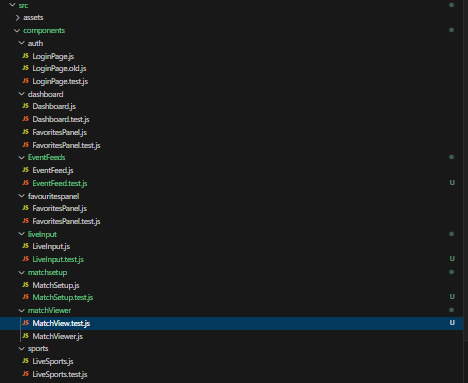
Section titled “Our Folder Structure:
”5. How to Run Automated Tests:
Section titled “5. How to Run Automated Tests:”A small test by test description on how to run the automated tests for both frontend components and backend APIs.
1. Install Dependencies
Section titled “1. Install Dependencies”Make sure you have installed all project dependencies:
npm install2. Run All Tests
Section titled “2. Run All Tests”To run every test (React + API):
npm testThis will:
-
Discover all files ending with .test.js inside both src/ and api/.
-
Run them in parallel.
-
Display results in the terminal.
3. Run Coverage Report
Section titled “3. Run Coverage Report”To generate a code coverage report:
npm run test:coverageThe summary appears in the terminal.
Code Coverage Reports
Section titled “Code Coverage Reports”-
We track line, function, branch, and statement coverage.
-
Configured in package.json → jest.collectCoverageFrom:
"collectCoverageFrom": [ "src/components/**/*.{js,jsx}", "src/lib/**/*.{js,jsx}", "src/app.js", "api/**/*.js", "!api/**/__tests__/**", "!src/**/*.test.{js,jsx}"]- Target: 80%+ coverage across all major areas.
Example Coverage Output
Section titled “Example Coverage Output”File | % Stmts | % Branch | % Funcs | % Lines---------------------------------------------------------------All files | 84.12 | 78.34 | 80.27 | 84.99 src/components/ | 82.14 | 75.00 | 79.00 | 83.00 src/lib/ | 90.00 | 88.00 | 85.00 | 91.00 api/ | 87.50 | 80.00 | 83.00 | 86.75---------------------------------------------------------------7. UI Testing
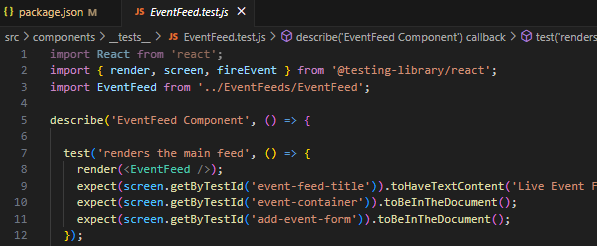
Section titled “7. UI Testing”We use React Testing Libraryto simulate user interactions:
Rendering components correctly
Testing form submissions (e.g., adding a live event)
Checking that the UI updates when events are added/removed
Example Test:
9. Continuous Integration (CI/CD)
Section titled “9. Continuous Integration (CI/CD)”We use GitHub Actions to automate testing and coverage uploads.
This ensures that every commit and pull request is validated before merging.
Workflow File: .github/workflows/tests.yml
Section titled “Workflow File: .github/workflows/tests.yml”Our CI workflow runs on push and pull_request events.
Steps Overview
Section titled “Steps Overview”-
Checkout Repository
- Pulls the code from GitHub so the workflow can run tests.
-
Setup Node.js Environment
- Ensures a consistent Node.js version (18.x) across local and CI builds.
-
Install Dependencies
- Runs
npm cito install dependencies based onpackage-lock.json.
- Runs
-
Run Tests with Coverage
- Executes
npm run test:coverageto generate test and coverage reports.
- Executes
-
Upload Coverage to Codecov
- Sends the coverage report to Codecov for reporting on PRs and dashboards.
Example Workflow
Section titled “Example Workflow”name: Tests and Coverage
on: [push, pull_request]
jobs: tests: runs-on: ubuntu-latest steps: - name: Checkout Repository uses: actions/checkout@v3
- name: Setup Node uses: actions/setup-node@v3 with: node-version: 18.x
- name: Install Dependencies run: npm ci --silent env: NPM_CONFIG_LOGLEVEL: error
- name: Run Tests with Coverage run: npm run test:coverage env: CI: true NODE_OPTIONS: --max-old-space-size=4096 --no-warnings GENERATE_SOURCEMAP: false ESLINT_NO_DEV_ERRORS: true
- name: Upload Coverage to Codecov uses: codecov/codecov-action@v3 with: token: ${{ secrets.CODECOV_TOKEN }}10. Codecov Integration
Section titled “10. Codecov Integration”We use Codecov to track and visualize test coverage across the project.
Codecov integrates directly into GitHub pull requests, so developers can see coverage changes immediately.
Why Codecov?
Section titled “Why Codecov?”- PR Comments → Coverage changes appear directly in GitHub PRs.
- Dashboards → View detailed reports of which files/functions lack tests.
- Threshold Enforcement → Optionally fail builds if coverage drops below a certain percentage.
Setup Steps
Section titled “Setup Steps”- Sign in at Codecov using GitHub.
- Add your repository.
- Generate a repository token.
- In GitHub:
- Navigate to Settings → Secrets and variables → Actions.
- Add a new repository secret:
- Name:
CODECOV_TOKEN - Value:
<your-generated-token>
- Name:
Example Workflow Snippet
Section titled “Example Workflow Snippet”Once the secret is added, the GitHub Actions workflow uploads coverage automatically:
11. Common Issues & Fixes
Section titled “11. Common Issues & Fixes”Here are recurring problems in test development and how we address them:
| Issue | Cause | Fix |
|---|---|---|
| Found multiple elements with same text | getByText matched more than one node | Use getAllByText or add within() queries for precision |
| Async tests failing | Component hadn’t finished rendering | Replace getByText with await findByText |
| Coverage missing for certain files | Jest’s collectCoverageFrom excluded them | Update package.json → "collectCoverageFrom": ["src/components/**/*.{js,jsx}", ...] |
| Memory leaks in Jest | Long-running async calls or unmocked timers | Use jest.useFakeTimers() or cleanup mocks in afterEach |
| API tests timeout | Real API calls too slow | Mock APIs with Jest, or increase timeout using jest.setTimeout(30000) |
🔗 References:
12. Closing Notes
Section titled “12. Closing Notes”Our testing and CI/CD strategy ensures:
- Unit tests validate business logic.
- UI tests confirm components behave correctly under user interaction.
- Integration tests verify frontend ↔ backend communication.
- Coverage reports via Codecov enforce accountability.
- CI/CD pipelines with GitHub Actions guarantee every commit and pull request is tested.
- User feedback continuously improves our test suite with real-world insights.
By combining automation with user input, we maintain high confidence in code quality while delivering features quickly and safely.