API Documentation
Sports Live API Documentation
Section titled “Sports Live API Documentation”The Sports Live application provides a RESTful API’s for accessing live sports data, user preferences, and reporting functionality. The API is designed to be internal and external friendly, supports real-time updates, and follows established API design principles.
1. API Availability
Section titled “1. API Availability”1.1 Internal Usage
Section titled “1.1 Internal Usage”- All endpoints are used by the frontend for live updates, user preferences, admin operations, and reporting.
- Full read/write access is supported with appropriate authentication.
1.2 External Usage
Section titled “1.2 External Usage”- External users (e.g., third-party apps) can access read-only endpoints:
/api/matches/api/players/api/teams/api/standings
- External POST/PUT/DELETE requests require authentication
2. API Architecture
Section titled “2. API Architecture”- RESTful Design: Each resource has its own endpoint.
- HTTP Methods:
GET→ Fetch dataPOST→ Create new resourcesPUT→ Update existing resourcesDELETE→ Remove resources
- Hierarchical organization:
/api/matches/:id/events→ Nested events for a match/api/users/:id/favorites→ User-specific favorite teams
Architecture Diagram
Section titled “Architecture Diagram”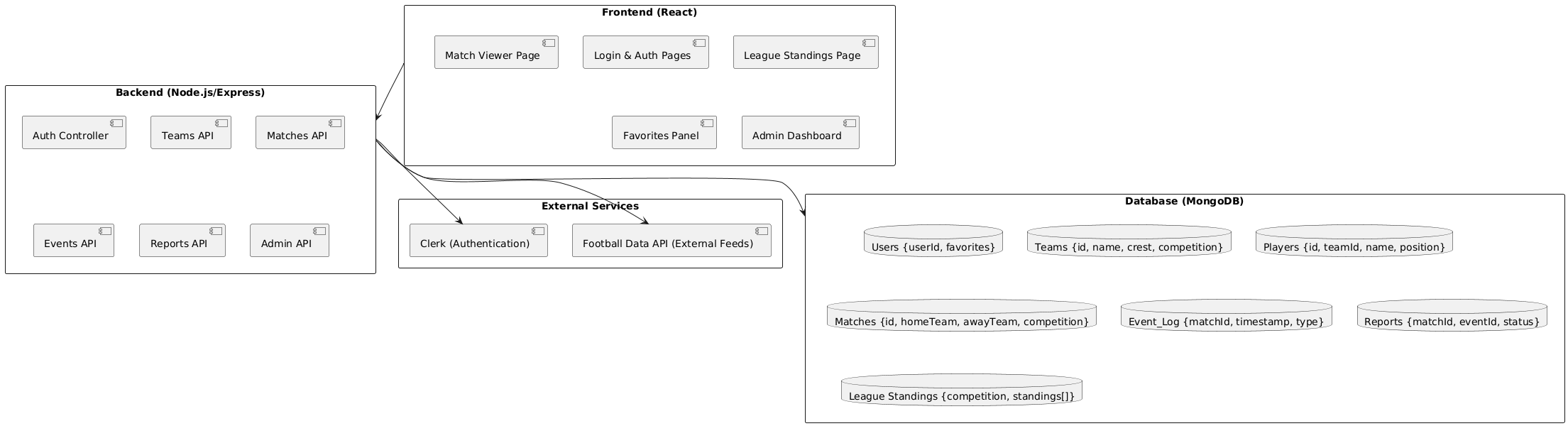
3. API Endpoints
Section titled “3. API Endpoints”3.1 Matches
Section titled “3.1 Matches”- Fetches live and upcoming football match data
- Returns JSON with game information including scores, teams
- Match Api: https://sports-live.onrender.com/api/matches
| Endpoint | Method | Description |
|---|---|---|
/api/matches | GET | Fetch all live and upcoming matches |
/api/matches/:id | GET | Fetch a single match by ID |
/api/matches | POST | Create new match(es) |
/api/matches/:id | PUT | Update match information |
/api/matches/:id | DELETE | Delete a match |
Example Response (GET /api/matches):
{ "data": [ { "id": "123", "home_team": "Team A", "away_team": "Team B", "score": "2-1", "status": "live", "start_time": "2025-09-19T14:00:00Z" } ]}3.2 Players
Section titled “3.2 Players”- Fetches Live PLayer data
- Returns JSON with each player information
- Players Api: https://sports-live.onrender.com/api/players
| Endpoint | Method | Description |
|---|---|---|
/api/players | GET | Fetch all players |
/api/players/:id | GET | Fetch a specific player by ID |
Example Response (GET /api/players):
{ "data": [ { "id": "1", "name": "John Doe", "team": "Team A", "position": "Forward" } ]}3.3 Teams
Section titled “3.3 Teams”- Fetches Live Teams data
- Provides team names.
- Team Api: https://sports-live.onrender.com/api/teams
| Endpoint | Method | Description |
|---|---|---|
/api/teams | GET | Fetch all teams |
/api/teams/:id | GET | Fetch a specific team by ID |
/api/teams | POST | Create new teams (admin only) |
Example Response (GET /api/teams):
{ "data": [ { "id": "101", "name": "Team A", "logo_url": "https://example.com/logoA.png" }, { "id": "102", "name": "Team B", "logo_url": "https://example.com/logoB.png" } ]}3.4 Standings
Section titled “3.4 Standings”- Provides league standings for competitions/seasons.
- Standings API: https://sports-live.onrender.com/api/standings
| Endpoint | Method | Description |
|---|---|---|
/api/standings | GET | Fetch competition standings |
/api/standings/:id | GET | Fetch standings for a specific competition/season |
Example Response (GET /api/standings):
{ "data": [ { "rank": 1, "team": "Team A", "points": 45 }, { "rank": 2, "team": "Team B", "points": 42 } ]}3.5 User Preferences
Section titled “3.5 User Preferences”- Stores and manages user favorite teams.
- Requires user authentication.
- User Favorites API:
/api/users/:id/favorites
| Endpoint | Method | Description |
|---|---|---|
/api/users/:id/favorites | GET | Get user favorite teams |
/api/users/:id/favorites | POST | Add a team to favorites |
/api/users/:id/favorites/:teamName | DELETE | Remove a team from favorites |
/api/users/:id/favorites | PUT | Update all favorites |
Example Response (GET /api/users/:id/favorites):
{ "data": ["Team A", "Team C"]}3.6 Reports
Section titled “3.6 Reports”- Used for user or admin-generated reports.
- Reports API: https://sports-live.onrender.com/api/reporting
| Endpoint | Method | Description |
|---|---|---|
/api/reporting | GET | Fetch all reports |
/api/reporting/:id | GET | Fetch a specific report |
/api/reporting | POST | Create a report |
/api/reporting/:id | PUT | Update a report |
/api/reporting/:id | DELETE | Delete a report |
Example Response (POST /api/reporting):
{ "data": { "id": "901", "title": "Injury Report", "description": "Player injured during match." }}4. Deployment & Integration
Section titled “4. Deployment & Integration”- Hosting: API is deployed on Render.com with a MongoDB backend.
- CI/CD: Continuous integration ensures backend code is deployed after successful builds.
- Integration: Connected with frontend via REST calls and WebSocket polling for real-time updates.
5. Performance & Monitoring
Section titled “5. Performance & Monitoring”- Load Handling: Supports up to 500 simultaneous match/event updates per minute.
- Error Handling: Returns HTTP error codes with descriptive error messages.
- Monitoring Tools: Render logs, backend middleware, and automated error reporting.
6. Design Considerations
Section titled “6. Design Considerations”- HTTP Methods Correctness: GET, POST, PUT, DELETE follow REST standards.
- No Redundant Endpoints: Single source of truth per resource.
- Hierarchical Organization: Matches, events, and users modeled as nested resources.
- Response Consistency: All endpoints return JSON with the same schema.
- Authentication & Authorization: Required for modifying resources.
7. Real-Time Usage (Internal)
Section titled “7. Real-Time Usage (Internal)”- Realtime DB Listener:
onValue(ref(db, 'matches'), callback)for live updates. - Supports: matches, teams, and user favorites.
- Polling Interval: 30 seconds (configurable).
8. Example Usage (JavaScript)
Section titled “8. Example Usage (JavaScript)”import { apiClient } from './api';
async function loadLiveMatches() { const matches = await apiClient.getMatches(); console.log(matches.data);}
loadLiveMatches();