Database Documentation
1.Choice of Database + Justification
Section titled “1.Choice of Database + Justification”We use MongoDB to store all core match and event data.It’s aNoSQL document-based database, Stores data in JSON-like documents, which maps naturally to our application’s data (matches, events, teams). Authentication is handled by Clerk, which issues a userId. This userId is stored in MongoDB for personalization features such as favorite teams.
2. Deployment Information
Section titled “2. Deployment Information”2.1 Installition
Section titled “2.1 Installition”Install MongoDB Node.js driver
npm install mongodb2.2 Connection String
Section titled “2.2 Connection String”Copy the following connection string, with the link to the database and the password
mongodb+srv://dybalasantiago15_db_user:<db_password>@sportslivetracker.8wemqpi.mongodb.net/?retryWrites=true&w=majority&appName=SportsLiveTracker2.3 Enviroment Variables
Section titled “2.3 Enviroment Variables”Store the full URI in the [.env]
mongodb+srv://dybalasantiago15_db_user:theYYtiktoker@sportslivetracker.8wemqpi.mongodb.net/?retryWrites=true&w=majority&appName=SportsLiveTracker2.4 Connecting in Node.js
Section titled “2.4 Connecting in Node.js”Using the MongoDBdriver
import { MongoClient } from "mongodb";
const client = new MongoClient(process.env.MONGO_URI);
async function connectDB() {  try {    await client.connect();    console.log("✅ Connected to MongoDB");    return client.db("sport-live-feeds");  } catch (err) {    console.error("❌ DB connection failed", err);  }}
export default connectDB;
3. Database Schema
Section titled “3. Database Schema”3.1 Users
Section titled “3.1 Users”Stores authentication + personalization data.
{  {  "_id": "68b1f9451da001bdf2c9aa2b",  "userId": "user_31A7bWsnnZJfbsVJLIGAwPPMyMq",  "favorites": ["Arsenal FC", "Liverpool FC", "Everton FC"],  "lastUpdated": "2025-09-20T00:30:30.681Z"}
}
3.2 Teams
Section titled “3.2 Teams”Stores official team metadata.
{  {  "_id": "68b1c9731da001bdf2c9a8f2",  "id": 1765,  "name": "Fluminense FC",  "shortName": "Fluminense",  "tla": "FLU",  "venue": "Estadio Jornalista Mário Filho",  "founded": 1902,  "clubColors": "Maroon / Green / White",  "crest": "https://crests.football-data.org/1765.png",  "competition": "Campeonato Brasileiro Série A",  "competitionCode": "BSA",  "address": "Rua Álvaro Chaves 41, Bairro Laranjeiras Rio de Janeiro, RJ 22231-220",  "website": "http://www.fluminense.com.br",  "lastUpdated": "2025-08-29T15:38:19.426Z"}
}
3.3 Players
Section titled “3.3 Players”Stores player details linked to a team.
{ {  "_id": "68b1c9791da001bdf2c9a970",  "id": 22815,  "name": "Gabriel Fuentes",  "dateOfBirth": "1997-02-09",  "position": "Defence",  "nationality": "Colombia",  "teamId": 1765,  "teamName": "Fluminense FC",  "lastUpdated": "2025-09-20T01:04:47.073Z"}
}
3.4 Match_Info
Section titled “3.4 Match_Info”{ { "_id": "68b4f28a1da001bdf2c9aa8e", "id": 535175, "homeTeam": { "id": 64, "name": "Liverpool FC" }, "awayTeam": { "id": 61, "name": "Chelsea FC" }, "competition": { "id": 2021, "name": "Premier League" }, "matchday": 25, "stage": "REGULAR_SEASON", "status": "TIMED", "utcDate": "2025-09-28T19:00:00Z", "odds": {}, "referees": [], "score": {}, "lastUpdated": "2025-09-20T01:04:32.017Z"}
}3.5 Event_Log
Section titled “3.5 Event_Log”Stores live match events
{ { "_id": "68cd19d588417e618825acc4", "matchId": 535965, "timestamp": "2025-09-19T08:52:37.073Z", "type": "goal", "message": "Goal - CR Flamengo", "data": { "id": "1758271957073_ozb96kv54m", "type": "goal", "team": "CR Flamengo", "teamSide": "home", "player": "", "description": "Goal - CR Flamengo" }, "source": "external_feed", "createdAt": "2025-09-19T08:52:37.073Z"}3.6 League Standings
Section titled “3.6 League Standings”Stores current league table.
{  {  "id": "PL-2025",  "area": {    "id": 2072,    "name": "England",    "code": "ENG",    "flag": "https://crests.football-data.org/770.svg"  },  "competition": {    "id": 2021,    "name": "Premier League",    "code": "PL",    "type": "LEAGUE",    "emblem": "https://crests.football-data.org/PL.png"  },  "season": {    "id": 2403,    "startDate": "2025-08-15",    "endDate": "2026-05-24",    "currentMatchday": 5,    "winner": null  },  "standings": [],  "lastUpdated": "2025-09-20T01:04:36.479Z"
}
3.7 Reports
Section titled “3.7 Reports”User/admin-generated reports tied to matches/events.
{ {  "id": "68cc76fe12d588ead4c8e19e",  "matchId": 551965,  "eventId": "1758229386807_yj1gj01ii",  "title": "fgfg",  "description": "gfg",  "status": "pending",  "createdAt": "2025-09-18T21:17:50.513Z",  "updatedAt": "2025-09-18T21:17:50.513Z"}
}
3.8 Admin Matches
Section titled “3.8 Admin Matches”Used internally to schedule and track matches for reporting & live input.
{ {  "homeTeam": "Manchester United",  "awayTeam": "Arsenal FC",  "competition": "Premier League",  "matchday": 10,  "utcDate": "2025-10-05T15:30:00Z"}
}
4. Relationships
Section titled “4. Relationships”USERS ↔ FAVORITE_TEAMS
Section titled “USERS ↔ FAVORITE_TEAMS”- One
USERcan have manyFAVORITE_TEAMSentries. - Relationship type: One-to-Many
TEAMS ↔ PLAYERS
Section titled “TEAMS ↔ PLAYERS”- Many
FAVORITE_TEAMSentries can point to the sameTEAM. - Relationship type: Many-to-One
REPORTS ↔ MATCH_INFO / EVENT_LOG
Section titled “REPORTS ↔ MATCH_INFO / EVENT_LOG”- A report may relate to a match or a specific event within that match.
- Relationship type: Many-to-One
MATCH_INFO ↔ TEAMS
Section titled “MATCH_INFO ↔ TEAMS”- Each
MATCH_INFOdocument contains an array of twoteamIDs. - Relationship type: Many-to-Many League Standings → Teams: indirect relationship through competition ID.
MATCH_INFO ↔ EVENT_LOG
Section titled “MATCH_INFO ↔ EVENT_LOG”- A single match can produce many events.
- Relationship type: One-to-Many
MATCH_INFO ↔ DISPLAY_STATE
Section titled “MATCH_INFO ↔ DISPLAY_STATE”- Each match has one live display state..
- Relationship type: One-to-One
ADMIN MATCHES ↔ TEAMS
Section titled “ADMIN MATCHES ↔ TEAMS”- Each Admin Can create **many ** live display state..
- Relationship type: One-to-One
5 Entity Relationship Diagram(ERD)
Section titled “5 Entity Relationship Diagram(ERD)”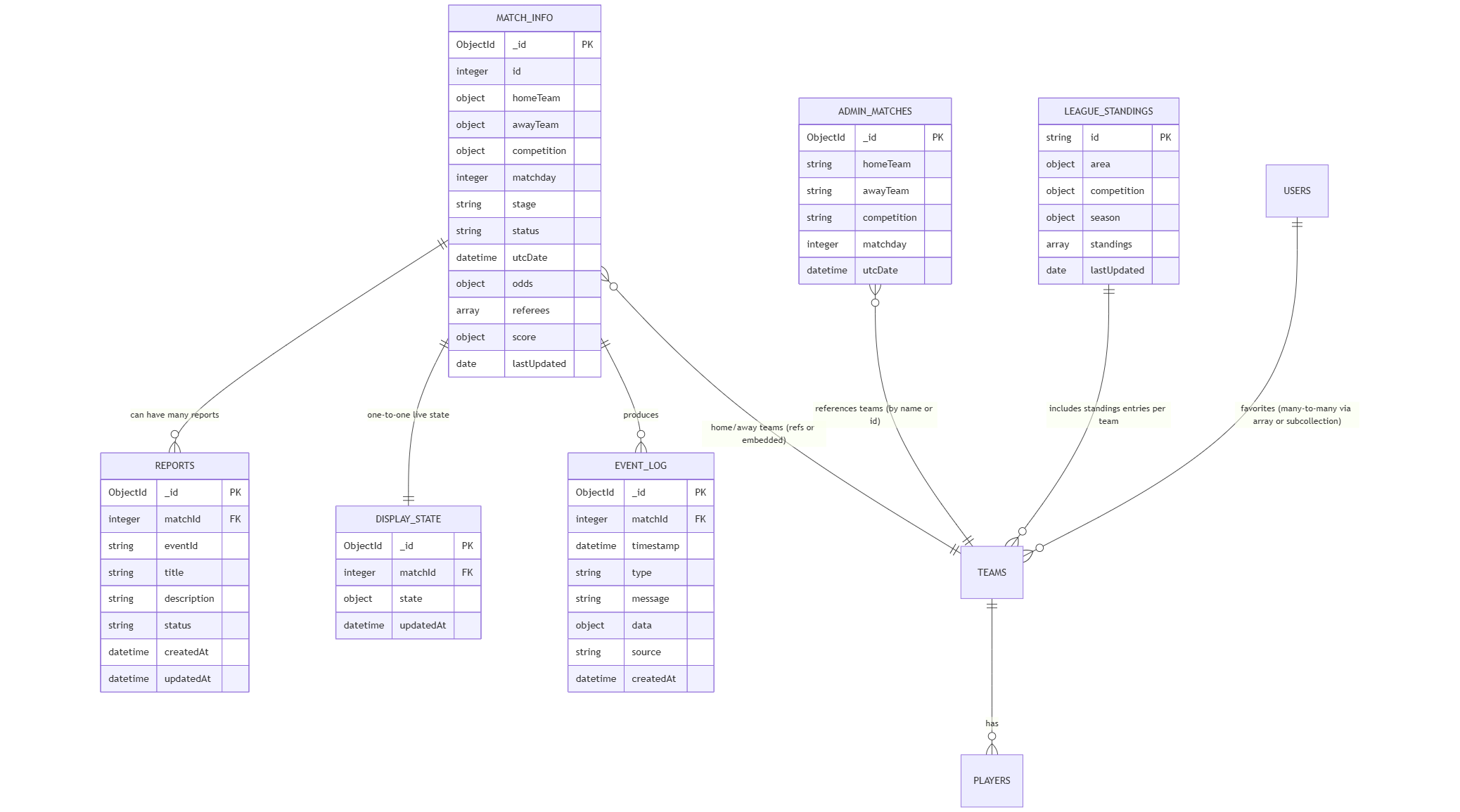
6. References
Section titled “6. References”- MongoDb Documentation: https://www.mongodb.com/docs
- Clerk Authentication Docs: https://clerk.com/docs
- MongoDB Node.js Driver: https://www.mongodb.com/docs/drivers/node/current
6.1 Video Reference
Section titled “6.1 Video Reference”- Youtube Video Reference : https://www.youtube.com/watch?v=SV0o0qOmKOQ