Bug Tracking
1. Purpose of Bug Tracking
Section titled “1. Purpose of Bug Tracking”The Bug Tracking system ensures that issues, errors, and feature defects are recorded, monitored, and resolved in a structured way. This process guarantees code quality, accountability, and transparency during development.
2. Tool of Choice + Justification
Section titled “2. Tool of Choice + Justification”We use GitHub Issues as the primary bug tracker.
Why GitHub Issues?
- Integrated directly into our GitHub repository.
- Supports labels, milestones, and project boards.
- Allows developers, testers, and stakeholders to collaborate on bug resolution.
- Provides traceability by linking issues to commits, pull requests, and releases.
3. Workflow
Section titled “3. Workflow”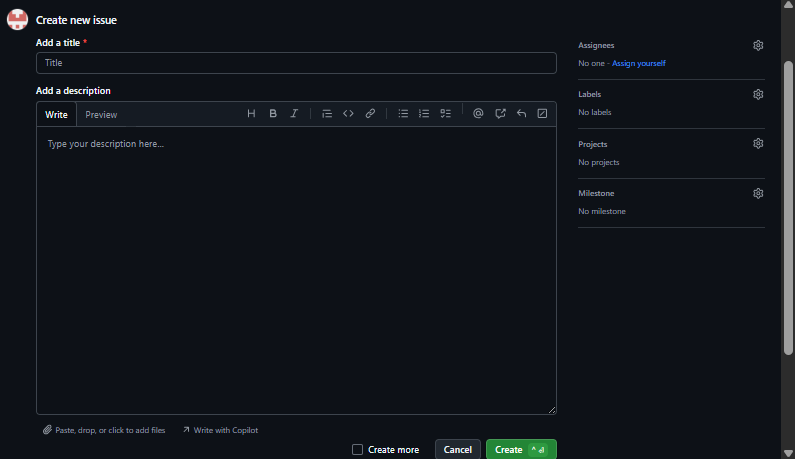
3.1 Reporting a Bug
Section titled “3.1 Reporting a Bug”- A bug is reported as a GitHub Issue.
- Each issue must include:
- Title (clear summary of the bug).
- Description (steps to reproduce, expected vs. actual result).
- Severity & Priority (critical, major, minor).
- Attachments (screenshots, logs, test cases if applicable).
3.2 Triage
Section titled “3.2 Triage”- Bugs are reviewed and assigned labels:
bug– confirmed bugneeds-info– waiting for more detailscritical– blocking releaseenhancement– not a bug, but a suggested improvement
3.3 Assignment
Section titled “3.3 Assignment”- Bugs are assigned to a developer.
- Related issues are linked to milestones (e.g., Sprint 2).
3.4 Resolution
Section titled “3.4 Resolution”- Developer fixes the bug and links the commit or pull request to the issue.
- The issue status moves from
Open→In Progress→Review→Closed.
3.5 Verification
Section titled “3.5 Verification”- QA team or reporter verifies the fix before the issue is closed.
- If the bug persists, the issue is reopened.
3.6 Assigning to Milestones (Sprints)
Section titled “3.6 Assigning to Milestones (Sprints)”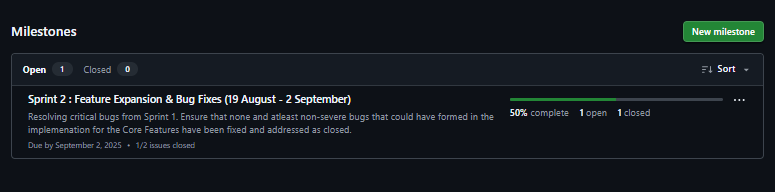
- Each issue is linked to a Milestone, which corresponds to a sprint.
- Example:
- Milestone: Sprint 2 (19 Aug – 2 Sept)
- Issues:
- Bug: Google not working
- Bug: Docs site not deploying
- Enhancement: Add favorite teams page
4. Example Bug Report (Template)
Section titled “4. Example Bug Report (Template)”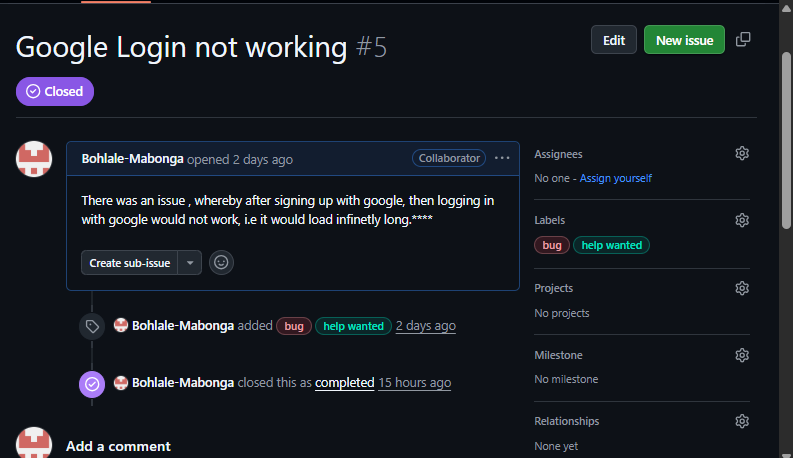
### Bug Title:Google Login not working
### Description- **Steps to Reproduce**:  1. Open the app on a browser  2. Click on sign in using google  3. Enter valid credentials  4. After being sent to login page again  3. Click "Login"- **Expected Result**: User should be logged in- **Actual Result**: Nothing happens after clicking and loads forver
### SeverityCritical
### Environment- Device: PC- Browser: Chrome for Windows- Backend API: Sprint 1 v1.0.0